
Most web browsers have phishing and malware detection turned on by default. The screening is based on the Google Safe Browsing technology.
This is not been added or done by the hosting server, the warning is been added by google security
If a website is marked and blacklisted by Google, a visitor gets a distinct, full-screen alert blocking access to the respective site:
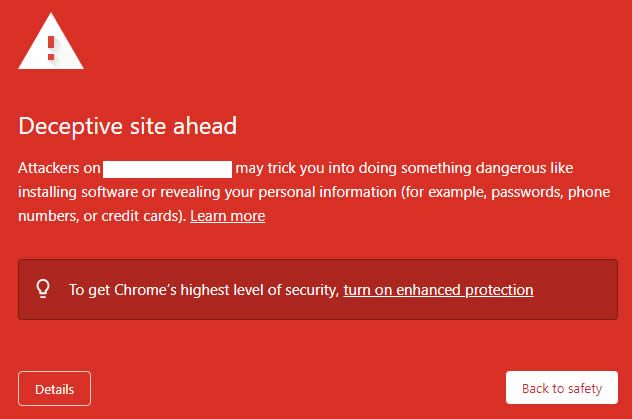
"Deceptive site ahead" is the most common warning message. The following variations are also possible:
- "The site ahead contains malware"
- "Suspicious site"
- "The site ahead contains harmful programs"
- "This page is trying to load scripts from unauthenticated sources"
- "Visiting this website may harm your computer"
- Your HTML or PHP code was hacked
- The redirects to harmful and infected sites were inserted through iframes or JavaScript
- Flash .swf files were added to your website
You can inspect specific links of your website with the help of Google Site Status diagnostic tool. Or, if you have Google Search Console set up, navigate to the Security & Manual Actions >> Security issues to check the list of affected pages and get additional info on them.
What is malware?
It is malicious software specifically created to gain access or damage a computer without the knowledge of the owner. Viruses, worms, and Trojan horses are examples of malicious software that are often grouped together and referred to as malware. Malware can open access to your personal information, such as passwords and credit card numbers, or alter your search results without your knowledge.
How to fix the issue
Below are some suggestions on how to resolve this issue if it’s happening to your site:
1. Scan and remove the malicious content from your site. You can use the Virus Scanner option in cPanel as well as the Google Site Status diagnostic tool, or contact our Live Chat team for help.
2. Scan your PC.
3. Register and verify your site in the Google Search Console.
4. Check the Security Issues section of Google Search Console to see details of sample URLs that may be infected.
5. Find the cause of the security issue and fix it. Otherwise, your site is likely to be reinfected.
6. Request a review in the Security Issues section in Google Search Console (or via the Report Incorrect Phishing Warning tool) when your entire site is clean and secure. Once Google determines your site is fixed, they will remove the malware label.
That's it!
How can I prevent my website from being blacklisted?
You can prevent your website from being blacklisted by Google, it is very important to proactively secure your website or blog against viruses, malware, and vulnerabilities. Our security addon like SiteLock can help, and as a Pmasteck Host client, you can get a great plan at a discounted price.
Don't wait for a search engine like Google to detect malicious scripts or activity on your website before you take action. Only a small percentage of websites infected with malware end up blacklisted by Google, and in many cases, the infection is severe and very costly to recover from by the time they do.
